Weather Now Launcher - Radar
Homescreen AppsWeather
4.17.58K Reviews
- Version
- 1.6.5
- Installs
- 5.00M
- Age Rating
- Everyone
Screenshots
Our Review of Weather Now Launcher - Radar
 Analysis by Appyee
I usually check the weather at the point where it affects a decision: whether to walk, what to wear, or if I should leave earlier. That makes a radar app more useful to me than a forecast I glance at once and forget. Weather Now Launcher - Radar is built around that practical moment, bringing weather information and storm tracking together on a phone. I’d consider it when I want a quick local check, especially on a day when rain could change my plans.
Begin with the question you actually need answered
Before opening a weather app, I find it helps to be specific. “Will it rain today?” is different from “Is a shower moving toward my route right now?” Weather Now is aimed at the second kind of question as well as everyday local updates, with radar and weather information in one place. That focus is useful when I need to make a near-term choice rather than read a broad forecast and guess what it means for the next hour.
The app is free and is developed by Homescreen Apps. Its weather focus is apparent in the way it brings attention to conditions such as rain, wind, storms, and lightning. It is rated for Everyone, so it is suitable for a general audience. The current version is 1.1.92, and Android support starts at version 9. Those details make it straightforward to judge whether it fits a device and a household, though the best test is still whether its local information answers the questions I check most often.
From a quick check to a practical decision
I use this section to connect a quick weather check with the decision that follows, rather than treating radar as something to watch for its own sake. The useful question is what I can still change—when to leave, what to carry, or whether to suggest an indoor plan—before the weather gets in the way.
Read the radar as a planning aid
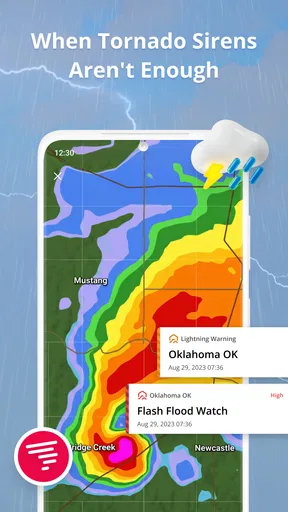
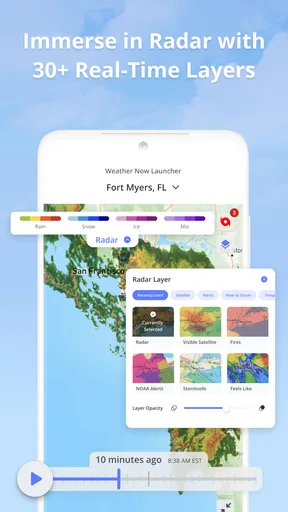
When I’m deciding whether to head out, I treat radar as a visual aid, not a promise. A weather map can help me notice rain nearby and think about whether to wait, bring a jacket, or choose a different time. The app’s attention to live radar and storm conditions gives that check more context than a simple sun-or-cloud icon. Still, I wouldn’t use a screen view as a guarantee that a particular street or outdoor event will stay dry.
One useful habit is to check the map before committing to a plan, then look again when conditions are changing. That second glance can matter more than repeatedly refreshing while nothing is happening. If I’m leaving for a short errand, I want a quick answer; if I’m setting off for a longer walk, I need to allow for conditions changing along the way. The app is most helpful when I use it to make that kind of judgment instead of expecting it to make the decision for me.
Make alerts part of the handoff
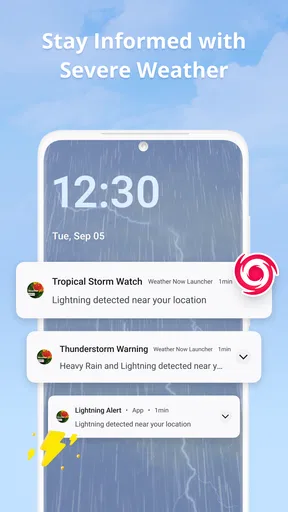
Weather alerts can bridge the gap between checking the forecast and getting on with the day. Rather than keeping the app open, I can use an alert as a prompt to reassess a plan if the weather turns. That is particularly relevant when a storm might affect a commute, an outdoor appointment, or time spent away from home. An alert is a nudge to check what is happening, not a substitute for paying attention to official safety guidance during severe conditions.
I also think about who else is affected by a weather decision. If I’m meeting someone outdoors, changing the time or location is more useful than simply knowing rain is possible. Weather Now can contribute the information that starts that conversation, while the actual handoff—telling a friend, adjusting a pickup, or moving an activity indoors—still depends on me. That distinction keeps the app in its proper role: a practical source of awareness, not an automatic planner.
Use the home screen for repeat checks
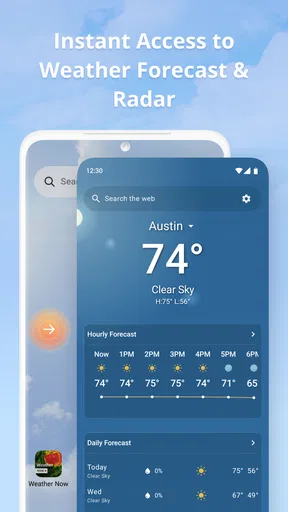
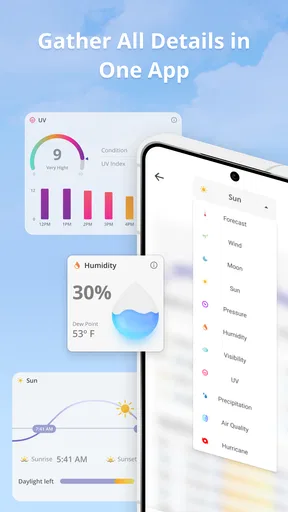
For a routine that involves checking conditions several times a day, a widget can reduce the friction of opening an app and finding the same information again. I like the idea of putting a weather glance where I already look, especially before leaving home. The trade-off is that a small home-screen view is best for quick orientation; when I need to understand a developing storm, I’d still open the app and inspect the radar rather than rely on a compact summary.
That creates a sensible workflow: use the home screen to notice that conditions may matter, then open the weather view to decide what to do. A widget is not useful just because it is visible; it earns its space when it helps me act sooner. If I rarely check weather or prefer a minimal phone layout, keeping the app available without giving it a prominent home-screen spot may be the better choice.
Where it fits among weather apps
Compared with a basic forecast app, Weather Now’s appeal is its emphasis on radar and changing conditions. A simple daily forecast can be faster when all I want is the high-level outlook, and a national weather service’s own resources may be preferable when I need official warnings or detailed safety instructions. I see this app as a convenient everyday layer between those needs: more visual than a plain forecast, but not something I’d treat as the final authority in a dangerous situation.
Its audience is therefore fairly clear. It makes sense for someone who checks local weather before walking, commuting, gardening, or arranging an outdoor meetup, and who finds a map easier to interpret than a short text summary. It is less compelling for someone who wants only a simple daily temperature, dislikes notifications, or needs specialist forecasting for work. In those cases, a basic forecast or a dedicated professional source may suit the task better.
A realistic day with changing plans
Imagine I’m about to walk to a nearby appointment and the sky looks uncertain. I check the local conditions, look at the radar, and decide whether to take a rain layer or leave a little earlier. If an alert arrives later, I use it as a reason to check again and message the person I’m meeting if the plan needs to move indoors. That is a modest workflow, but it is exactly where a weather app can save hassle: it helps me notice a change early enough to respond.
For a longer trip, I would be more cautious. Local weather information can help with the first leg, but conditions may differ across the route, and an app glance should not replace checking the relevant forecast for the destination. I’d also avoid treating a radar image as a precise countdown to rain at my exact location. The practical value is in seeing enough to make a better-informed choice, not in gaining certainty that weather cannot provide.
Small trade-offs that shape daily use
Radar is most useful when I interpret it alongside the rest of the situation. A map may show nearby activity, but the decision to cancel an outdoor plan also depends on timing, shelter, how long I’ll be outside, and how flexible the plan is. My tip is to decide in advance what would make me change course—for example, a warning, worsening conditions, or rain arriving before I can reach cover. That prevents me from staring at the map without turning the information into an action.
Notifications are another personal trade-off. They can be valuable when I might otherwise miss a developing weather change, but frequent prompts can become noise if I already check conditions regularly. I’d keep alerts useful by responding to them as cues to reassess rather than leaving every notification to interrupt the day. The right balance depends on how often weather affects your plans and how much interruption you tolerate.
There is also a difference between seeing weather information and being able to act on it. A radar check before leaving is helpful if I can bring a jacket or adjust the time; it is less useful if I’m already outdoors with no easy alternative. For that reason, I’d make the check at a decision point—before a commute, before a walk, or before setting up outside—rather than relying on last-minute updates to solve a problem that has already begun.
What to expect before installing
The app has an average rating of 4.3 from around 40,000 ratings, with roughly 6,000 written reviews, and it has been installed over 5 million times. Those figures suggest that it has found a broad audience, but they do not tell me whether its local presentation will suit my habits. I’d judge it by trying the radar and the everyday information in the places where I actually spend time, then deciding whether the alerts and home-screen options are useful rather than assuming popularity guarantees a perfect fit.
Because it is free, trying it does not require a purchase, but free is not the same as frictionless. A weather app still needs to earn its place through information I can read quickly and use confidently. If I only want a glance at the day’s general conditions, a built-in phone forecast may already be enough. If I often change plans around rain or storms, the more visual approach here may justify keeping it close at hand.
Intuitive Design and User-Friendly Interface
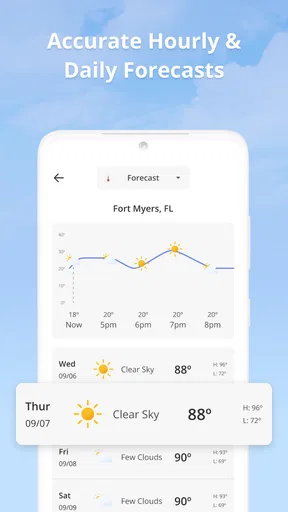
From the moment I opened Weather Now Launcher - Radar, I was impressed by its sleek and intuitive design. The app is super user-friendly, making it perfect for anyone who wants quick access to weather updates without the hassle. The interface is clean and organized, with all the essential features right at your fingertips. No more fumbling through endless menus—everything is laid out perfectly.
Real-Time Radar and Weather Alerts
What really sets this app apart is its real-time radar feature. I’ve tried a lot of weather apps, but the radar on this one is incredibly detailed and accurate. You can see weather patterns as they happen, which is pretty cool. Plus, the app sends timely weather alerts. Whether it’s a sudden storm or a heatwave, you’ll get a heads-up so you can plan accordingly. It’s like having a weather forecaster whispering in your ear.
Customization and Widgets Galore
Now, if you’re anything like me, you love customizing your phone. Weather Now Launcher - Radar doesn’t disappoint in this department. You can personalize the app with various themes and widgets that fit your style. The widgets are particularly handy—they provide at-a-glance info right on your home screen, so you’re always in the know.
Performance and Battery Usage
I know what you’re thinking: "But won’t all these features drain my battery?" Surprisingly, no! The app is optimized to run efficiently without hogging your phone’s resources. Even with frequent updates and radar usage, my battery life remained unaffected. It’s like magic!
Final Thoughts
All in all, Weather Now Launcher - Radar is a must-have app for anyone who wants to stay informed about the weather. It’s reliable, accurate, and packed with features that make it stand out from the crowd. Whether you’re planning a trip or just need to know if you should grab an umbrella before you head out, this app has got you covered. So, go ahead and give it a try—you won’t be disappointed!
Privacy and Permissions
See what permissions an app requests and how it handles your data.
- Location
- approximate location (network-based), precise location (GPS and network-based)
- Phone
- directly call phone numbers
- Photos/Media/Files
- read the contents of your USB storage, modify or delete the contents of your USB storage
- Storage
- read the contents of your USB storage, modify or delete the contents of your USB storage
- Wi-Fi connection information
- view Wi-Fi connections
- Other
- view network connections, expand/collapse status bar, full network access, run at startup, set wallpaper, control vibration, prevent device from sleeping, set an alarm, Google Play license check, read Google service configuration
Verdict
Strengths of Weather Now Launcher - Radar
- User-friendly interface and intuitive design.
- Accurate and real-time weather updates.
- Customizable widgets for quick access.
- Minimal battery consumption.
- Detailed radar maps for precise forecasts.
Limitations of Weather Now Launcher - Radar
- Frequent ads can be intrusive.
- Limited free features; premium needed.
- Occasional delays in data refresh.
- Requires internet for most features.
- Lacks advanced settings for power users.
Other Releases by Homescreen Apps
View All
Easy Homescreen
Personalization4.0

ScanNow Home
Productivity4.2

Bible Homescreen - Read Now
Books & Reference4.5
Similar Picks in This Category
View All
Weather - By Xiaomi
Xiaomi Inc.4.1

Weather & Radar Forecast
WetterOnline4.8

Weather
OneLouder Apps4.6

AccuWeather: Weather Radar
AccuWeather3.6

The Weather Channel - Radar
The Weather Channel4.6

1Weather Forecasts & Radar
OneLouder Apps4.3
Frequently Asked Questions
What features does Weather Now Launcher - Radar offer?
Weather Now Launcher - Radar provides real-time weather updates, interactive radar maps, and customizable widgets for your home screen. It also offers detailed forecasts, severe weather alerts, and the ability to track multiple locations. The app integrates seamlessly with your device, making it a convenient tool for weather enthusiasts.
Is Weather Now Launcher - Radar free to use?
Yes, Weather Now Launcher - Radar offers a free version with basic features. However, it also includes in-app purchases for premium features, such as ad-free usage and additional customization options. Users can choose whether they need the extra features based on their personal preferences and requirements.
How accurate is the weather information in Weather Now Launcher - Radar?
Weather Now Launcher - Radar sources its data from reliable meteorological services, offering accurate and up-to-date weather information. The app uses advanced algorithms to provide precise forecasts and radar updates, ensuring users have trustworthy details to plan their day effectively. However, like all weather apps, occasional discrepancies can occur.
Can I customize the notification settings in Weather Now Launcher - Radar?
Yes, Weather Now Launcher - Radar allows users to customize notification settings to suit their preferences. You can choose to receive alerts for specific weather conditions, set do-not-disturb times, and adjust the frequency of updates. This flexibility ensures you get relevant information without unnecessary interruptions.
Does Weather Now Launcher - Radar impact battery life significantly?
Weather Now Launcher - Radar is designed to be efficient, but as with any app that runs in the background and provides real-time updates, it may affect battery life. Users can mitigate this by adjusting update intervals and disabling certain features when not needed, ensuring a balance between functionality and battery usage.
